The Smart POS Terminal comes with Android 10, is easy to use, portable, and suitable for all types of stores. And for EvoCashierTH, you can instantly accept QR code payments from Chinese customers using WeChat Pay, UnionPay, and Alipay.
SMARTPOS N82
A smart payment terminal that supports payments via UPi, WeChat, and Alipay
The SMARTPOS N82 is a powerful, stable, and secure smart POS machine. Running on Android 10, it features a 1.5 GHz quad-core processor, delivering a premium user experience, and boasts a large battery. Its slim and lightweight design makes it easily portable.
Press the CARD button or insert the card, enter the amount, then the customer enters the card code. The screen will display the results. (Example video of a sales transaction.)
An application for accepting QR code payments from various platforms.
Make QR payments easily with just a scan! EvoCashierTH is an application that allows you to accept payments from WeChat Pay, UnionPay QR, and Alipay by scanning a QR code. Currently, Alipay and WeChat have over 1 billion users in China. If you want to expand your business to Chinese tourists, EvoCashierTH is the best choice for you.
With EvoCashierTH, you can:
Collect payments by scanning WeChat / UPI QR codes / Alipay / Alipay+
The service provider will send an activation code or QR code to the merchant for login.
Payments via QR Code
Select the “Receive Payments” menu, enter the desired amount, and choose a payment method (WeChat Pay, Alipay, Union Pay QR). The app will display a QR code for the customer to scan for payment.
Canceling a refund request
Select the “Cancel” menu, enter the Transaction ID or scan the barcode (which can be found in your customer service app). The system will display a “Refund Approved” screen for confirmation.
History Report of Transactions
The store can view a daily report of all transactions (up to 30 days after the transaction date). ** If the store requires historical data beyond 30 days, they can contact the service provider to request a report. **
Frequently Asked Questions
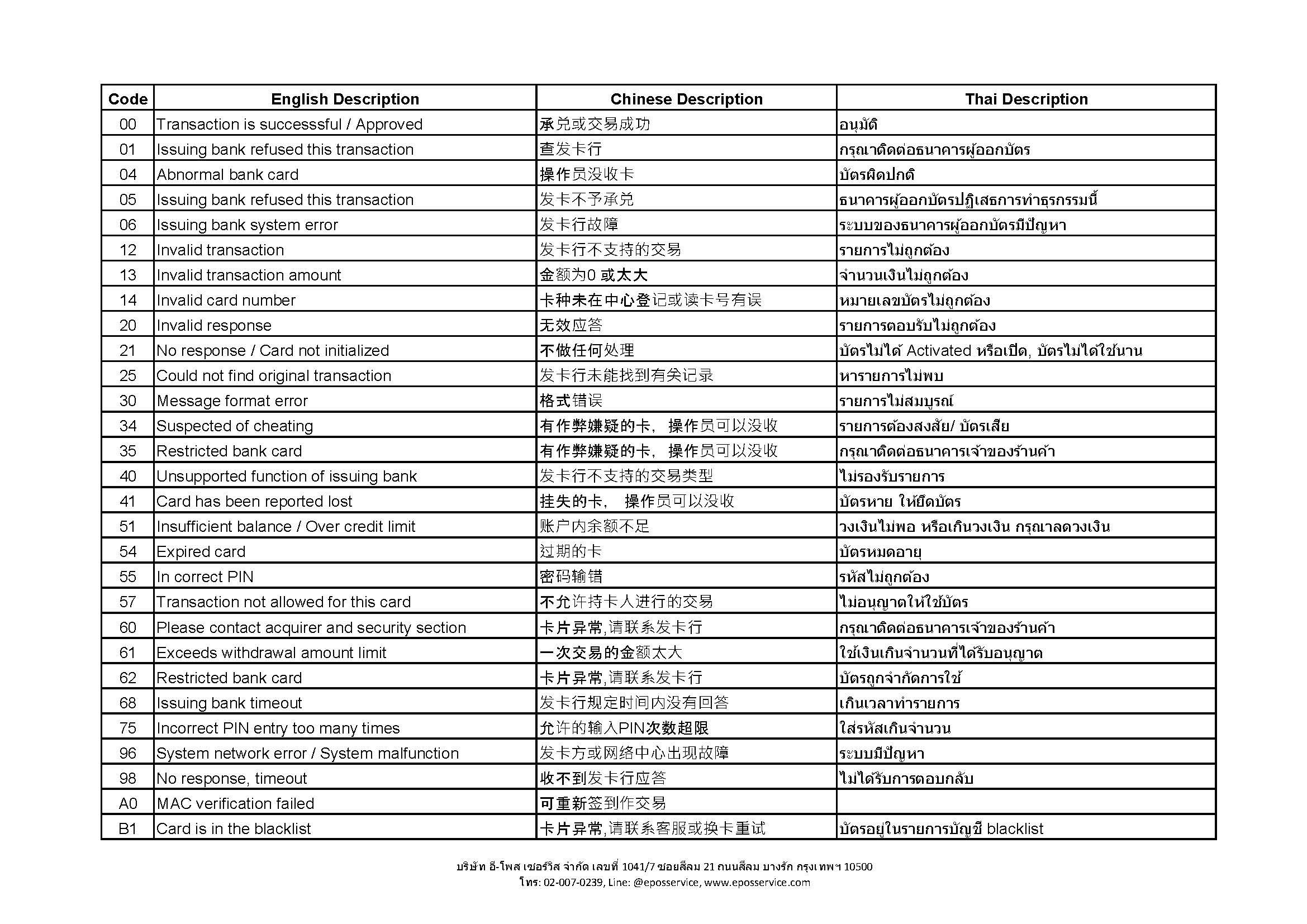
What does this error code mean?
Generally, an error code is a two-digit alphanumeric code that indicates why the request was rejected. It can be found at ERROR CODE.
What payment methods does EvoCashierTH offer?
EvoCashierTH offers payment methods via Wechat Pay, Alipay, Alipay+, and Union Pay QR.
If I encounter problems using the service, who should I contact?
You can contact our support team via Line OA: @eposservice
Contact Us
Send us a message and our team will get back to you